
Privilege Escalation Attacks: How One Compromised Account Can Take Down Your Entire System

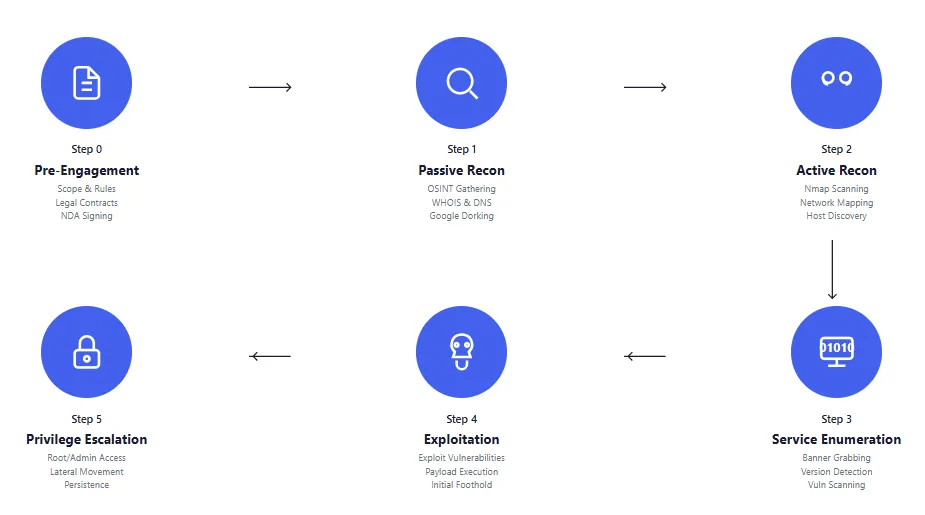
A marketing intern clicks on a PDF attachment that looks like it came from HR. The file opens, nothing suspicious happens on screen, and she goes back to updating social media posts. Three weeks later, the company’s entire customer database is being sold on a dark web forum, their file servers are encrypted with ransomware, and forensics teams are trying to figure out how attackers got domain admin credentials when the initial breach was just a low-level user account with access to nothing important.
This happens constantly, and the mechanism behind it—privilege escalation—is something that security teams understand in theory but constantly underestimate in practice. The intern’s account had zero access to sensitive systems. She couldn’t touch the customer database, couldn’t modify server configurations, couldn’t do anything an attacker would actually want. But that account was a starting point, not a destination, and the gap between “low-level user” and “domain administrator” turned out to be far smaller than anyone assumed.
Understanding Privilege Escalation
Privilege escalation is exactly what it sounds like: an attacker starts with limited access and works their way up to higher access. The reason this matters so much is that initial compromises almost never give attackers what they actually want. Phishing campaigns hit whoever clicks first, which is usually someone in a non-technical role without elevated permissions. Exploited vulnerabilities in public-facing applications often drop attackers into sandboxed environments or service accounts with minimal rights. The initial foothold is rarely useful on its own.
So attackers need to climb. They need to take that compromised marketing intern account and somehow leverage it into something with actual power—ideally domain admin, root access, or whatever constitutes the keys to the kingdom in that particular environment. The entire attack chain depends on this step, which is why privilege escalation vulnerabilities and misconfigurations are so valuable to attackers. You can have the best phishing defenses in the world, but if your internal permissions are a mess, one successful email is all it takes.
The Two Directions: Vertical and Horizontal
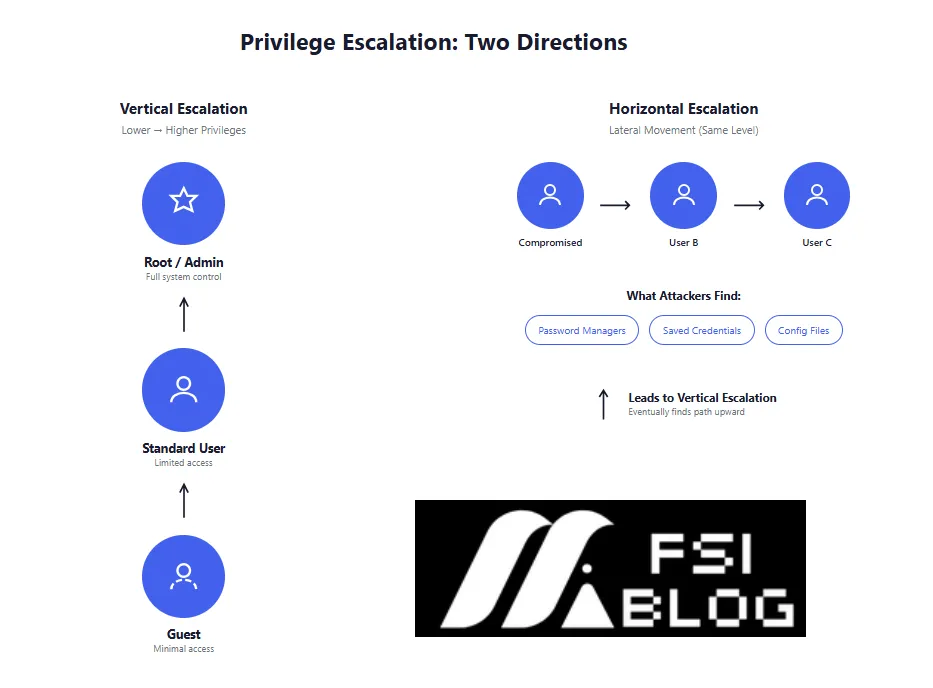
Security folks break privilege escalation into two categories, and understanding the difference matters because they require different defenses.
Vertical escalation is the obvious one—moving from lower privileges to higher privileges. A regular user becomes an admin. A database reader gets write access. A container process escapes to root on the underlying host. This is what most people picture when they think about privilege escalation, and it’s the type that directly enables the worst outcomes. Once you have admin rights, you can do pretty much anything: access all data, modify security settings, create backdoors for persistence, disable logging, the whole nightmare scenario.
Horizontal escalation is sneakier and often overlooked. This is when an attacker moves laterally between accounts at the same privilege level. The compromised marketing intern account gets used to access another marketing employee’s files, or their credentials get leveraged to authenticate as a different user in a shared system. On paper, the attacker hasn’t gained any new permissions—they’re still operating at the same access tier. But in practice, horizontal movement often reveals new attack paths. Maybe that second user had a password manager with saved credentials for more sensitive systems. Maybe they had access to a shared drive that contains service account passwords in a plaintext config file that someone forgot to delete. Horizontal escalation is often just the setup for vertical escalation that comes later.
I’ve seen incident reports where attackers bounced through five or six accounts at the same privilege level before finally finding the one path that led upward. The security team initially dismissed the horizontal movement as unimportant because no privilege increase was detected, and by the time they realized what was happening, the attacker had already escalated vertically somewhere else entirely.
How Attackers Actually Do This
The technical mechanisms vary depending on the environment, but a few patterns show up over and over again.
Misconfigured permissions are probably the most common enabler. Some admin set up a service account three years ago with way more permissions than necessary because they were troubleshooting something and never went back to restrict it. A shared folder has read-write access for “authenticated users” instead of a specific group because someone couldn’t figure out the right group membership and just made it work. An IAM policy in AWS uses wildcards because the person writing it didn’t fully understand the permission model and copied an example from Stack Overflow. These misconfigurations sit dormant for months or years until an attacker finds them, and suddenly that low-privilege account can read secrets it was never supposed to access.
Credential theft is another major vector. Once an attacker has code execution on a machine—even as a low-privilege user—they can often dump credentials from memory. Windows systems in particular store authentication material in ways that tools like Mimikatz can extract, and if a domain admin ever logged into that workstation, their cached credentials might still be recoverable. Linux systems have their own equivalent issues with SSH keys, sudo credential caching, and config files that contain plaintext passwords for automated scripts. The compromised low-privilege account becomes a platform for harvesting credentials that unlock higher-privilege access elsewhere.
Token abuse matters especially in cloud environments and modern applications. OAuth tokens, service account keys, instance metadata credentials, Kubernetes service account tokens—all of these represent access that can be captured and replayed if an attacker gets to the right place. A container might have a service account token mounted by default that grants cluster-admin permissions because nobody changed the default settings. An EC2 instance might have an IAM role attached that allows full S3 access because it needed to read from one bucket and the policy was written too broadly. These tokens are essentially pre-authenticated access, and finding one with excessive permissions is like finding a skeleton key.
Trust relationships between systems create attack paths that aren’t obvious from looking at any single system in isolation. Active Directory trust relationships between domains, SSH key-based authentication between servers, federated identity arrangements between cloud accounts—all of these represent ways that access in one place can translate to access in another place. Attackers actively map these trust relationships because they’re often the fastest path from limited access to administrative control.
A Realistic Attack Scenario
The abstract patterns make more sense with a concrete example, so consider how an actual attack chain might unfold.
The phishing email that started everything was well-crafted—a fake invoice from a vendor the company actually uses, sent to an accounts payable employee who handles dozens of similar emails every day. The attached PDF exploited a vulnerability in the preview handler, and when she opened it, a small payload executed that established a reverse shell back to attacker infrastructure. The initial access was running under her user context, which meant access to her email, her local files, and whatever network shares she had permissions to reach. Not much of value.
The attacker spent the first few hours just looking around. They enumerated what systems her account could authenticate to, checked what processes were running on her workstation, and poked at network shares accessible from her machine. Most of what they found was useless—marketing materials, internal newsletters, that kind of thing. But on one shared drive, buried in a folder called “IT Stuff” that someone had shared too broadly, there was a spreadsheet called “server_passwords_old.xlsx” that contained exactly what it sounded like.
Most of those passwords had been changed, but one hadn’t. A test server that nobody really used anymore still had the same credentials, and that test server was domain-joined with a local admin account that hadn’t been rotated. The attacker moved laterally to the test server, now operating with local admin rights on that specific machine. They ran Mimikatz and found cached credentials for an IT support technician who had logged into the server six months ago to troubleshoot something.
The IT support account had access to a lot more. It could remote into user workstations for support purposes, access various internal applications, and—crucially—it had read access to a network share used for deploying software. On that share was a PowerShell script used for automated deployments that contained hardcoded credentials for a service account. The service account was a member of Domain Admins.
From phishing email to domain admin took about four days. The marketing employee’s account was never used for anything important and had no sensitive access. But it was connected, via a chain of misconfigurations and credential exposures, to the most privileged account in the entire environment. Each individual link in that chain probably seemed minor when it was created. The shared IT folder with one file that should have been deleted. The test server with outdated credentials. The support technician who logged into that server once. The deployment script with hardcoded passwords. Nobody reviewing any single one of those decisions would have predicted they could combine into a complete domain compromise.
Where Privilege Problems Concentrate
Certain parts of the technology stack seem especially prone to privilege escalation issues, mostly because of complexity, defaults that prioritize convenience over security, and the difficulty of auditing permissions across large environments.
Cloud Infrastructure
AWS, Azure, and GCP all have identity and access management systems that are powerful enough to enforce extremely granular permissions, but that same power creates complexity that leads to mistakes. IAM policies with wildcards are everywhere because they’re easier to write, and testing whether a restrictive policy actually allows the needed operations is tedious. Roles attached to compute instances often have far more permissions than the workload actually needs because someone attached a managed policy that was close enough instead of writing a custom one. Cross-account access and federated identity add additional complexity that creates unintended access paths.
Public cloud storage is its own special problem. S3 buckets with public read access have exposed sensitive data countless times, and while AWS has added numerous guardrails to prevent this, misconfigurations still happen. More subtle are the buckets that aren’t public but have overly permissive bucket policies that grant access to any authenticated AWS user, which is essentially the same thing since anyone can create an AWS account.
Database Systems
Database permissions often get configured once during initial setup and then forgotten. Someone grants SELECT on all tables because figuring out exactly which tables are needed is tedious, and years later that overly broad permission is still there. Shared credentials for application database access mean that compromising one application component reveals credentials that work everywhere. Row-level security that could limit exposure exists in most database platforms but rarely gets implemented because it requires ongoing maintenance as business logic changes.
The database administrator account password being stored in an application config file somewhere accessible is almost a cliché at this point, but it keeps happening because developers need database access during development and the path of least resistance is embedding credentials.
Server Operating Systems
Linux sudo configurations are a classic privilege escalation vector. Allowing users to run specific commands as root sounds restrictive until you realize that many commands have escape sequences or subshell options that can break out to a full root shell. The specifics of how sudo is configured matter enormously, and getting it wrong creates easy escalation paths. SUID binaries that are vulnerable to exploitation, kernel vulnerabilities that allow local privilege escalation, world-readable files containing credentials—the catalog of Linux privilege escalation techniques is extensive.
Windows environments have their own set of issues. Local administrator accounts with shared passwords across multiple machines mean that compromising one gives access to all of them. Service accounts running with domain admin privileges because troubleshooting was easier that way. Poorly configured Group Policy that allows unintended modifications. The Print Spooler vulnerabilities from a few years ago demonstrated how a single Windows service misconfiguration could lead to complete domain compromise.
Container and Kubernetes Environments
Containers add a layer of isolation that theoretically contains privilege escalation, but that isolation is easily undermined. Privileged containers can do almost anything to the underlying host. Host path mounts that share directories between container and host create escape routes. Kubernetes service account tokens mounted into pods by default represent access to the cluster API that many workloads don’t need.
Namespace boundaries in Kubernetes are weaker than many people assume. Cluster-scoped resources, permissive RBAC configurations, and service accounts with cluster-admin bindings all create ways to break out of what was supposed to be an isolated namespace. The pod security policies and admission controllers that could prevent these issues require deliberate configuration that many clusters don’t have.
Application APIs
Modern applications often use token-based authentication where the scope of access is encoded in the token itself. When tokens are issued with more permissions than necessary—common when developers are testing and just want things to work—those excessive permissions become available to anyone who captures the token. Broken object-level authorization, where the API trusts the caller to only request objects they should have access to, turns into horizontal privilege escalation when attackers simply request objects belonging to other users.
API keys for external services embedded in mobile applications or JavaScript bundles are technically credential exposure rather than privilege escalation, but the effect is similar—access that was supposed to be limited ends up far more available than intended.
Prevention That Actually Works
Preventing privilege escalation is fundamentally about limiting the blast radius of any single compromise. If every account has minimum necessary permissions and those permissions are regularly validated, the attack chains described earlier become much harder to execute.
Least privilege sounds simple but requires actual effort to implement. It means inventorying what access each account actually needs, which is tedious work that nobody wants to do. It means saying no when someone requests broad access because it would be convenient. It means accepting that restrictive permissions will occasionally cause friction when someone needs access they don’t have and has to request it through proper channels. Most organizations understand this conceptually but don’t commit to the ongoing work.
Just-in-time access is the practice of granting elevated permissions only when needed and only for a limited time window. Instead of a developer having permanent production database access, they request it when needed, get it approved, and the access automatically expires after a few hours. This reduces the window where those credentials could be stolen or misused, and it creates an audit trail of when elevated access was actually used. The tooling for this has gotten better, but it requires workflow changes that some organizations resist.
Regular access reviews mean actually looking at who has access to what and asking whether they still need it. This should happen on a schedule, ideally quarterly for sensitive systems. In practice, access reviews are often checkbox exercises where the reviewer rubber-stamps existing access without real scrutiny. Making them meaningful requires treating them as a genuine security control rather than compliance paperwork.
Monitoring for privilege escalation attempts means alerting on the patterns that attackers use. Unusual Kerberos ticket requests, credential dumping tool signatures, unexpected privilege changes, authentication patterns that suggest lateral movement—all of these can be detected if you’re looking for them. The challenge is tuning alerts so that real attacks stand out from the noise of normal activity, which requires understanding what normal actually looks like in your environment.
Network segmentation limits where a compromised account can even attempt to reach. If the marketing network can’t initiate connections to the database servers, the compromised marketing intern account is stuck even if it somehow obtains database credentials. Segmentation requires upfront architecture work and ongoing maintenance as the network evolves, but it fundamentally constrains attack paths in ways that other controls can’t.
Wrapping Up
The uncomfortable reality is that most environments have privilege escalation paths sitting dormant right now. The combination of legacy configurations nobody remembers, permissions granted during crises and never reviewed, and the natural accumulation of access over time creates attack chains that connect low-privilege footholds to administrative access. Attackers don’t need exotic techniques or zero-day exploits—they just need to find those paths and follow them.
Defending against this isn’t a single project or tool purchase. It’s an ongoing commitment to understanding what access exists in your environment, questioning whether it’s still appropriate, and actively removing the excess. The attack chain from phishing email to domain admin only works because each link in the chain existed. Remove any one of them—delete the old password spreadsheet, rotate the test server credentials, remove the cached credentials, don’t hardcode passwords in scripts—and the chain breaks.
Every compromise starts somewhere with limited access. Whether it stays limited or escalates to total system control depends entirely on what the attacker finds once they’re inside.